Planet Ensigogne
23 February 2017

France passed a law about “right to disconnect” (more info here or here). The idea of not sending professional emails when people are not supposed to read them in order to protect their private lifes, is a pretty good one, especially when hierarchy is involved. However, I tend to do email at random times, and I would rather continue doing that, but just delay the actual sending of the email to the appropriate time (e.g., when I do email in the evening, it would actually be sent the following morning at 9am).
I wonder how I could make this fit into my email workflow. I write email using mutt on my laptop, then push it locally to nullmailer, that then relays it, over an SSH tunnel, to a remote server (running Exim4).
Of course the fallback solution would be to use mutt’s postponing feature. Or to draft the email in a text editor. But that’s not really nice, because it requires going back to the email at the appropriate time. I would like a solution where I would write the email, add a header (or maybe manually add a Date: header — in all cases that header should reflect the time the mail was sent, not the time it was written), send the email, and have nullmailer or the remote server queue it until the appropriate time is reached (e.g., delaying while “current_time < Date header in email”). I don’t want to do that for all emails: e.g. personal emails can go out immediately.
Any ideas on how to implement that? I’m attached to mutt and relaying using SSH, but not attached to nullmailer or exim4. Ideally the delaying would happen on my remote server, so that my laptop doesn’t need to be online at the appropriate time.
Update: mutt does not allow to set the Date: field manually (if you enable the edit_headers option and edit it manually, its value gets overwritten). I did not find the relevant code yet, but that behaviour is mentioned in that bug.
Update 2: ah, it’s this code in sendlib.c (and there’s no way to configure that behaviour):
 /* mutt_write_rfc822_header() only writes out a Date: header with
 * mode == 0, i.e. _not_ postponment; so write out one ourself */
 if (post)
   fprintf (msg->fp, "%s", mutt_make_date (buf, sizeof (buf)));
23 February 2017 à 07:26
26 December 2016
There’s a pattern that comes up from time to time in the release management of free software projects.
To allow for big, disruptive changes, a new development branch is created. Most of the developers’ focus moves to the development branch. However at the same time, the users’ focus stays on the stable branch.
As a result:
- The development branch lacks user testing, and tends to make slower progress towards stabilization.
- Since users continue to use the stable branch, it is tempting for developers to spend time backporting new features to the stable branch instead of improving the development branch to get it stable.
This situation can grow up to a quasi-deadlock, with people questioning whether it was a good idea to do such a massive fork in the first place, and if it is a good idea to even spend time switching to the new branch.
To make things more unclear, the development branch is often declared “stable” by its developers, before most of the libraries or applications have been ported to it.
This has happened at least three times.
First, in the Linux 2.4 / 2.5 era. Wikipedia describes the situation like this:
Before the 2.6 series, there was a stable branch (2.4) where only relatively minor and safe changes were merged, and an unstable branch (2.5), where bigger changes and cleanups were allowed. Both of these branches had been maintained by the same set of people, led by Torvalds. This meant that users would always have a well-tested 2.4 version with the latest security and bug fixes to use, though they would have to wait for the features which went into the 2.5 branch. The downside of this was that the “stable” kernel ended up so far behind that it no longer supported recent hardware and lacked needed features. In the late 2.5 kernel series, some maintainers elected to try backporting of their changes to the stable kernel series, which resulted in bugs being introduced into the 2.4 kernel series. The 2.5 branch was then eventually declared stable and renamed to 2.6. But instead of opening an unstable 2.7 branch, the kernel developers decided to continue putting major changes into the 2.6 branch, which would then be released at a pace faster than 2.4.x but slower than 2.5.x. This had the desirable effect of making new features more quickly available and getting more testing of the new code, which was added in smaller batches and easier to test.
Then, in the Ruby community. In 2007, Ruby 1.8.6 was the stable version of Ruby. Ruby 1.9.0 was released on 2007-12-26, without being declared stable, as a snapshot from Ruby’s trunk branch, and most of the development’s attention moved to 1.9.x. On 2009-01-31, Ruby 1.9.1 was the first release of the 1.9 branch to be declared stable. But at the same time, the disruptive changes introduced in Ruby 1.9 made users stay with Ruby 1.8, as many libraries (gems) remained incompatible with Ruby 1.9.x. Debian provided packages for both branches of Ruby in Squeeze (2011) but only changed the default to 1.9 in 2012 (in a stable release with Wheezy – 2013).
Finally, in the Python community. Similarly to what happened with Ruby 1.9, Python 3.0 was released in December 2008. Releases from the 3.x branch have been shipped in Debian Squeeze (3.1), Wheezy (3.2), Jessie (3.4). But the ‘python’ command still points to 2.7 (I don’t think that there are plans to make it point to 3.x, making python 3.x essentially a different language), and there are talks about really getting rid of Python 2.7 in Buster (Stretch+1, Jessie+2).
In retrospect, and looking at what those projects have been doing in recent years, it is probably a better idea to break early, break often, and fix a constant stream of breakages, on a regular basis, even if that means temporarily exposing breakage to users, and spending more time seeking strategies to limit the damage caused by introducing breakage. What also changed since the time those branches were introduced is the increased popularity of automated testing and continuous integration, which makes it easier to measure breakage caused by disruptive changes. Distributions are in a good position to help here, by being able to provide early feedback to upstream projects about potentially disruptive changes. And distributions also have good motivations to help here, because it is usually not a great solution to ship two incompatible branches of the same project.
(I wonder if there are other occurrences of the same pattern?)
Update: There’s a discussion about this post on HN
26 December 2016 à 13:32
04 August 2016

Welcome to WordPress. This is your first post. Edit or delete it, then start writing!
04 August 2016 à 03:25
08 June 2016
Russell Coker wrote about Sysadmin Skills and University Degrees. I couldn’t agree more that a major deficiency in Computer Science degrees is the lack of sysadmin training. It seems like most sysadmins learned most of what they know from experience. It’s very hard to recruit young engineers (freshly out of university) for sysadmin jobs, and the job interviews are often a bit depressing. Sysadmins jobs are also not very popular with this public, probably because university curriculums fail to emphasize what’s exciting about those jobs.
However, I think I disagree rather deeply with Russell’s detailed analysis.
First, Version Control. Well, I think that it’s pretty well covered in university curriculums nowadays. From my point of view, teaching CS in Université de Lorraine (France), mostly in Licence Professionnelle Administration de Systèmes, Réseaux et Applications à base de Logiciels Libres (warning: french), a BSc degree focusing on Linux systems administration, it’s not usual to see student projects with a mandatory use of Git. And it doesn’t seem to be a major problem for students (which always surprises me). However, I wouldn’t rate Version Control as the most important thing that is required for a sysadmin. Similarly Dependencies and Backups are things that should be covered, but probably not as first class citizens.
I think that there are several pillars in the typical sysadmin knowledge.
First and foremost, sysadmins need a good understanding of the inner workings of an operating system. I sometimes feel that many Operating Systems Design courses are a bit too much focused on the “Design” side of things. Yes, it’s useful to understand the low-level mechanisms, and be able to (mentally) recreate an OS from scratch. But it’s also interesting to know how real systems are actually built, and what are the trade-off involved. I very much enjoyed reading Branden Gregg’s Systems Performance: Enterprise and the Cloud because each chapter starts with a great overview of how things are in the real world, with a very good level of detail. Also, addressing OS design from the point of view of performance could be a way to turn those courses into something more attractive for students: many people like to measure, benchmark, optimize things, and it’s quite easy to demonstrate how different designs, or different configurations, make a big difference in terms of performance in the context of OS design. It’s possible to be a sysadmin and ignore, say, the existence of the VFS, but there’s a large class of problems that you will never be able to solve. It can be a good trade-off for a curriculum (e.g. at the BSc level) to decide to ignore most of the low-level stuff, but it’s important to be aware of it.
Students also need to learn how to design a proper infrastructure (that meets requirements in terms of scalability, availability, security, and maybe elasticity). Yes, backups are important. But monitoring is, too. As well as high availability. In order to scale, it’s important to be able to automatize stuff. Russell writes that Sysadmins need some programming skills, but that’s mostly scripting and basic debugging. Well, when you design an infrastructure, or when you use configuration management tools such as Puppet, in some sense, you are programming, and in terms of needs to abstract things, it’s actually similar to doing object-oriented programming, with similar choices (should I use that off-the-shelf puppet module, or re-develop my own? How should everything fit together?). Also, when debugging, it’s often useful to be able to dig into code, understand what the developer was trying to do, and if the expected behavior actually matches what you are seeing. It often results in spending a lot of time to create a one-line fix, and it requires very advanced programming skills. Again, it’s possible to be a sysadmin with only limited software development knowledge, but there’s a large class of things that you are unlikely to address properly.
I think that what makes sysadmins jobs both very interesting and very challenging is that they require a very wide range of knowledge. There’s often the ability to learn about new stuff (much more than in software development jobs). Of course, the difficult question is where to draw the line. What is the sysadmin knowledge that every CS graduate should have, even in curriculums not targeting sysadmin jobs? What is the sysadmin knowledge for a sysadmin BSc degree? for a sysadmin MSc degree?
08 June 2016 à 08:04
25 May 2016
After missing the last few GStreamer hackfests I finally managed to attend this time. It was held in Thessaloniki, Greece’s second largest city. The city is located by the sea side and the entire hackfest and related activities were either directly by the sea or just a couple blocks away.
Collabora was very well represented, with Nicolas, Mathieu, Lubosz also attending.
Nicolas concentrated his efforts on making kmssink and v4l2dec work together to provide zero-copy decoding and display on a Exynos 4 board without a compositor or other form of display manager. Expect a blog post soon explaining how to make this all fit together.
Lubosz showed off his VR kit. He implemented a viewer for planar point clouds acquired from a Kinect. He’s working on a set of GStreamer plugins to play back spherical videos. He’s also promised to blog about all this soon!
Mathieu started the hackfest by investigating the intricacies of Albanian customs, then arrived on the second day in Thessaloniki and hacked on hotdoc, his new fancy documentation generation tool. He’ll also be posting a blog about it, however in the meantime you can read more about it here.
As for myself, I took the opportunity to fix a couple GStreamer bugs that really annoyed me. First, I looked into bug #766422: why glvideomixer and compositor didn’t work with RTSP sources. Then I tried to add a ->set_caps() virtual function to GstAggregator, but it turns out I first needed to delay all serialized events to the output thread to get predictable outcomes and that was trickier than expected. Finally, I got distracted by a bee and decided to start porting the contents of docs.gstreamer.com to Markdown and updating it to the GStreamer 1.0 API so we can finally retire the old GStreamer.com website.
I’d also like to thank Sebastian and Vivia for organising the hackfest and for making us all feel welcomed!

25 May 2016 à 20:43
26 December 2015
(This is just a copy of this debian-devel@ email)
Following my blog post yesterday with graphs about Debian packaging evolution, I prepared lists of packages for each kind of outdatedness. Of course not all practices highlighted below are deprecated, and there are good reasons to continue to do some of them. But still, given that they all represent a clear minority of packages, I thought that it would be useful to list the related packages. (I honestly didn’t know if some of my packages would show up in the lists!)
The lists are available at https://people.debian.org/~lucas/qa-20151226/
I also pushed them to alioth, so you can either do:
ssh people.debian.org 'grep -A 10 YOURNAME ~lucas/public_html/qa-20151226/*ddlist'
or:
ssh alioth.debian.org 'grep -A 10 YOURNAME ~lucas/qa-20151226/*ddlist'
the meaning of the lists is:
- qa-comaint_but_no_vcs.txt (275 packages): Based on the content of Maintainer/Uploaders, the package is co-maintained, but there are no Vcs-* fields.
- qa-format_10.txt (3153 packages): The package is still using format 1.0.
- qa-helper_classic_debhelper.txt (3647 packages): The package is still using “classic” debhelper (no dh, no CDBS).
- qa-helper_not_debhelper.txt (144 packages): The package is not using debhelper (nor dh, nor CDBS).
- qa-patch_dpatch.txt (170 packages): The package is using dpatch.
- qa-patch_modified-files-outside-debian.txt (1156 packages): The package has modified files outside the debian/ directory (not tracked using patches).
- qa-patch_more_than_one.txt (201 packages): The package uses more than one “patch system”. In most cases, it means that the package uses a patch system, but also has files modified directly outside of debian/.
- qa-patch_other.txt (51 packages): The package has patches, but using an unidentified/unknown patch system.
- qa-patch_quilt.txt (445 packages): The package uses quilt (with 1.0 format, not 3.0 format).
- qa-patch_simple-patchsys.txt (129 packages): The package uses simple-patchsys.
- qa-vcs_but_not_git_or_svn.txt (290 packages): The package is maintained using a VCS, which is not either Git or SVN.
- qa-vcs_more_than_one_declared_vcs.txt (1 package): The package declares more than one VCS.
If you don’t understand why your package is listed, you can have a look at allpackages-20151226.yaml that provides more details. If you still don’t understand, just ask me.
Excluding duplicates, a total of 5469 packages are listed. The dd-list output for the merged list is also available (which isn’t very useful, except to know if you are listed).
26 December 2015 à 11:34
25 December 2015
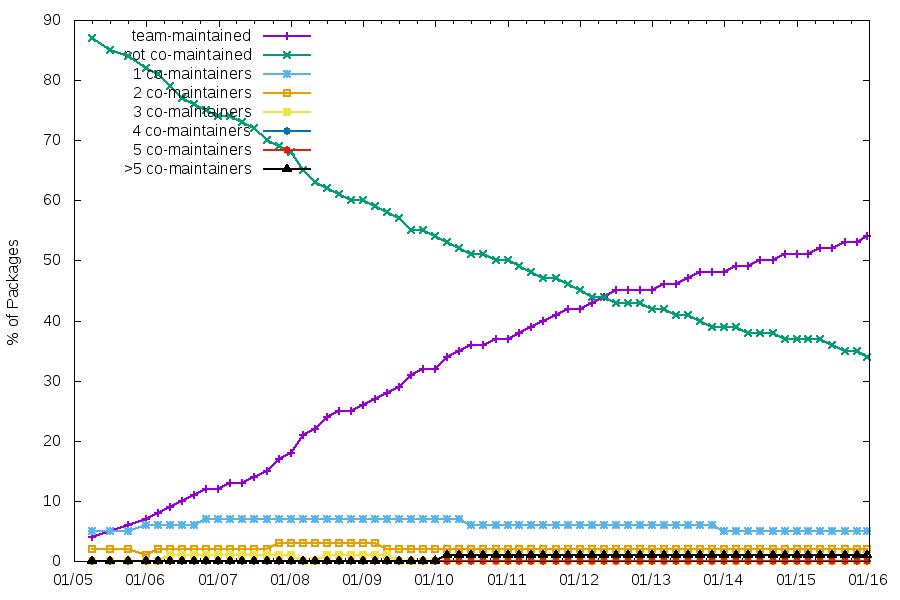
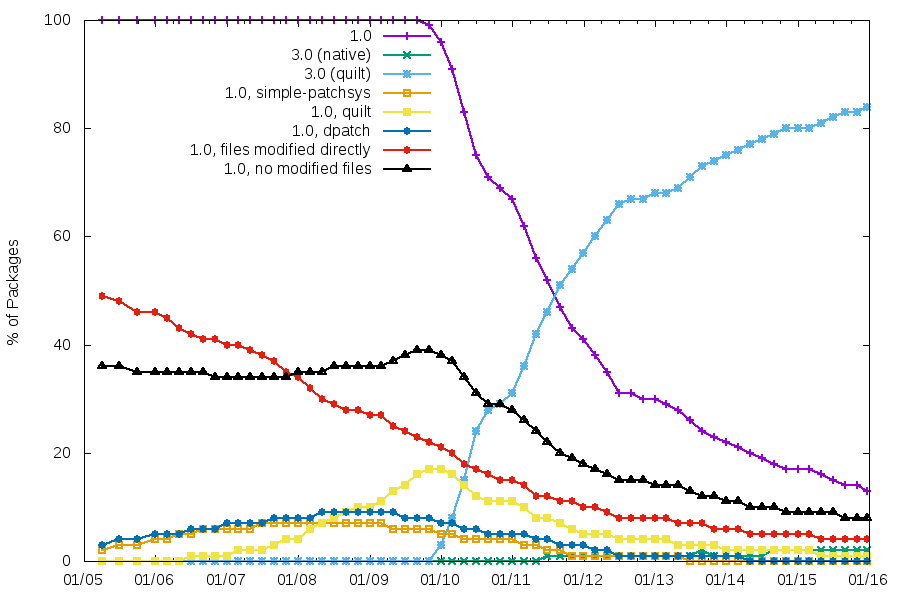
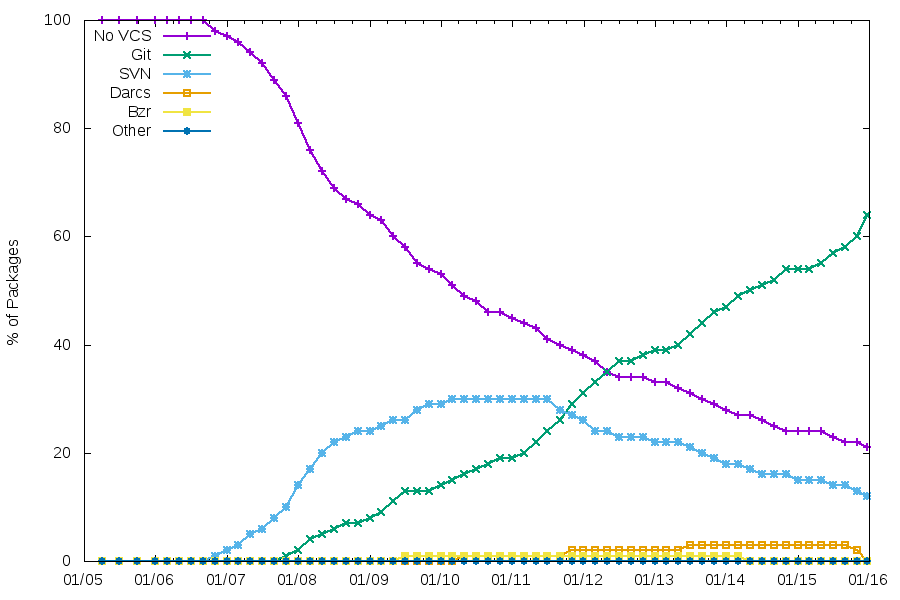
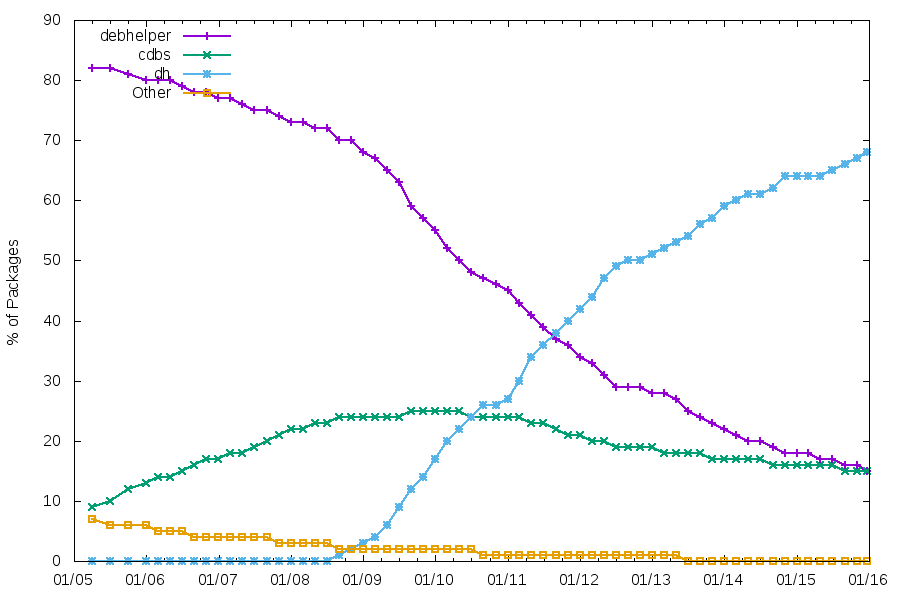
Here is an update to the usual graphs generated from snapshot.d.o. See my previous blog post for the background info.
In all graphs, it’s easy to see the effect of the Jessie freeze (and the previous freezes since 2005, too).
Team maintenance
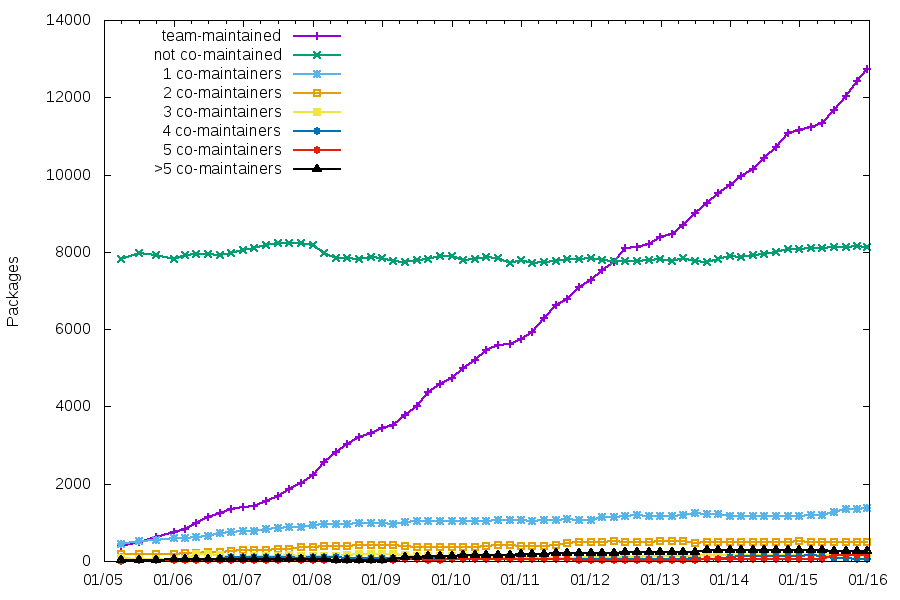
It’s interesting to see that, while the number of team-maintained packages increases, the number of packages that aren’t co-maintained is very stable.
Maintenance using a VCS
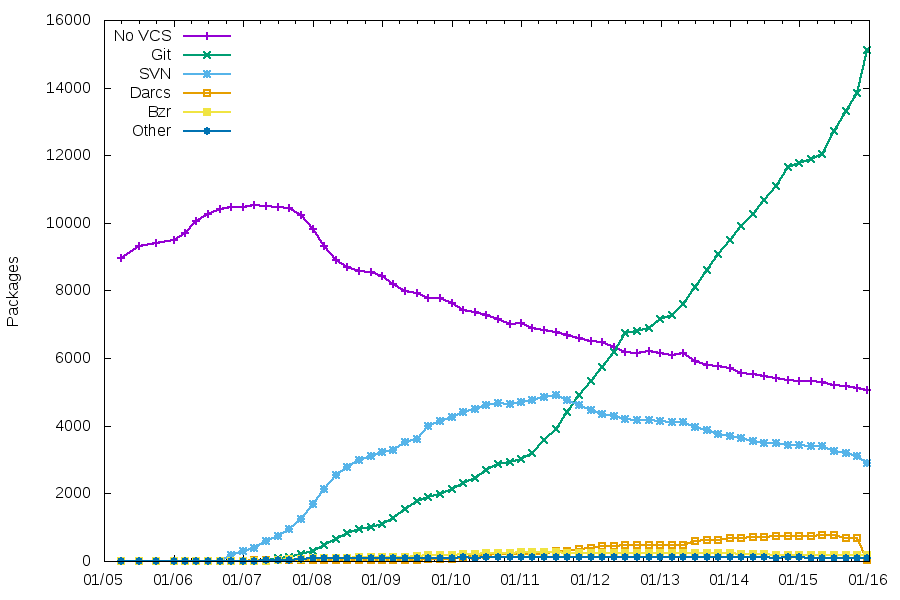
Git is the clear winner now, with the migration rate increasing recently.
Packaging helpers
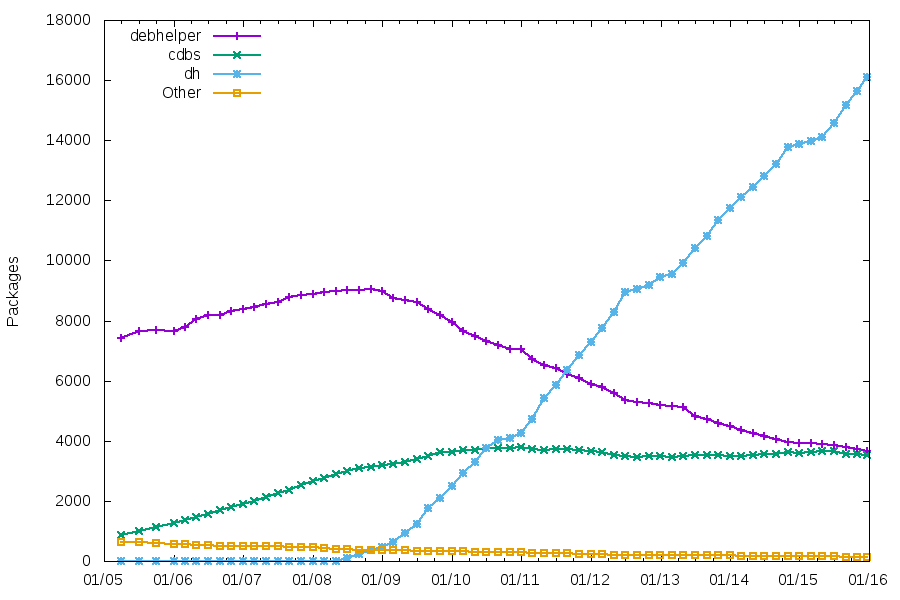
As usual, the number of packages using CDBS is quite stable. The number of packages using traditional debhelper might soon be lower than those using CDBS.
Patch systems and packaging formats
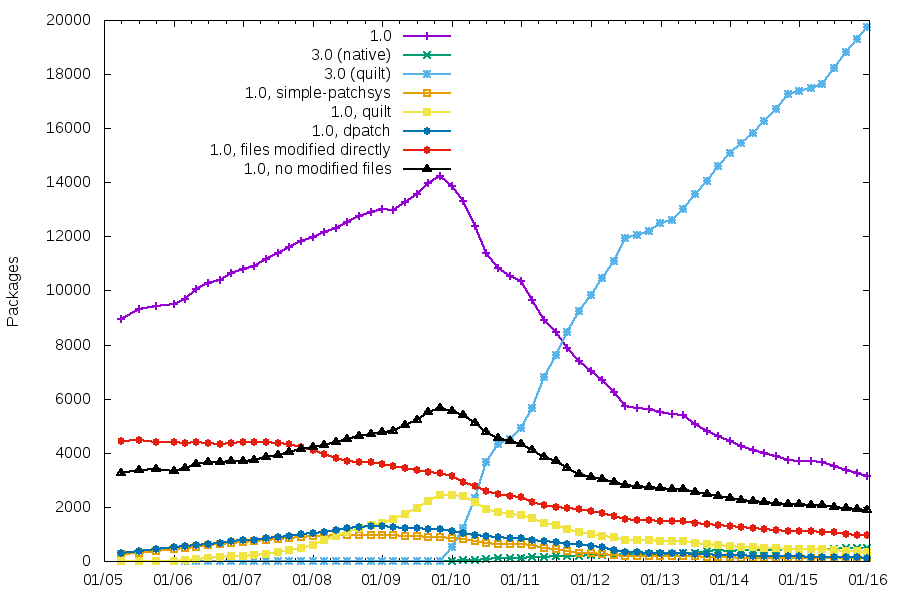
3.0 is the clear winner, even if we still have 3000+ packages using 1.0, and ~1000 of those modifying files directly. The other patch systems have basically disappeared.
So, all those graphs are kind-of boring now. Any good ideas of additional things to track, that be can identified reliably by looking at source packages?
For those interested, below are links to the graphs with percentages of packages.
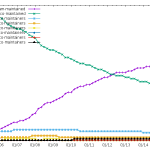
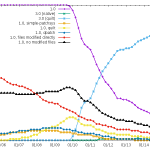
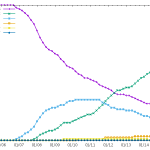
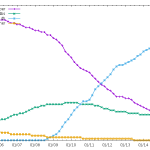
25 December 2015 à 22:35
28 August 2015
I attended DebConf’15 last week. After being on semi-vacation from Debian for the last few months, recovering after the end of my second DPL term, it was great to be active again, talk to many people, and go back to doing technical work. Unfortunately, I caught the debbug quite early in the week, so I was not able to make it as intense as I wanted, but it was great nevertheless.
I still managed to do quite a lot:
- I rewrote a core part of UDD, which will make it easier to monitor data importer scripts and reduce the cron-spam
- with DSA members, I worked on finding a suitable workaround for the storage performance issues that have been plaguing UDD for the last few months. fsyncs() will now longer hang for 15 minutes, yay!
- I added a DUCK importer to UDD, and added that information to the Debian Maintainer Dashboard
- I worked a bit on cleaning up the status of my packages, including digging into a strange texlive issue (that showed up in developers-reference), that is now fixed in unstable
- I worked a bit on improving git-buildpackage documentation (more to come in that area)
- Last but not least, I played Mao for the first time in years, and it was a lot of fun. (even if my brain is still slowly recovering)
DC15 was a great DebConf, probably one of the two bests I’ve attended so far. I’m now looking forward to DC16 in Cape Town!
28 August 2015 à 08:47
28 May 2015


Last week during the the OpenStack Summit in Vancouver, Intel organized a Rule the Stack contest. That's the third one, after Atlanta a year ago and Paris six months ago. In case you missed earlier episodes, SUSE won the two previous contests with Dirk being pretty fast in Atlanta and Adam completing the HA challenge so we could keep the crown. So of course, we had to try again!
For this contest, the rules came with a list of penalties and bonuses which made it easier for people to participate. And indeed, there were quite a number of participants with the schedule for booking slots being nearly full. While deploying Kilo was a goal, you could go with older releases getting a 10 minutes penalty per release (so +10 minutes for Juno, +20 minutes for Icehouse, and so on). In a similar way, the organizers wanted to see some upgrade and encouraged that with a bonus that could significantly impact the results (-40 minutes) — nobody tried that, though.
And guess what? SUSE kept the crown again. But we also went ahead with a new challenge: outperforming everyone else not just once, but twice, with two totally different methods.
For the super-fast approach, Dirk built again an appliance that has everything pre-installed and that configures the software on boot. This is actually not too difficult thanks to the amazing Kiwi tool and all the knowledge we have accumulated through the years at SUSE about building appliances, and also the small scripts we use for the CI of our OpenStack packages. Still, it required some work to adapt the setup to the contest and also to make sure that our Kilo packages (that were brand new and without much testing) were fully working. The clock result was 9 minutes and 6 seconds, resulting in a negative time of minus 10 minutes and 54 seconds (yes, the text in the picture is wrong) after the bonuses. Pretty impressive.
But we also wanted to show that our product would fare well, so Adam and I started looking at this. We knew it couldn't be faster than the way Dirk picked, and from the start, we targetted the second position. For this approach, there was not much to do since this was similar to what he did in Paris, and there was work to update our SUSE OpenStack Cloud Admin appliance recently. Our first attempt failed miserably due to a nasty bug (which was actually caused by some unicode character in the ID of the USB stick we were using to install the OS... we fixed that bug later in the night). The second attempt went smoother and was actually much faster than we had anticipated: SUSE OpenStack Cloud deployed everything in 23 minutes and 17 seconds, which resulted in a final time of 10 minutes and 17 seconds after bonuses/penalties. And this was with a 10 minutes penalty due to the use of Juno (as well as a couple of minutes lost debugging some setup issue that was just mispreparation on our side). A key contributor to this result is our use of Crowbar, which we've kept improving over time, and that really makes it easy and fast to deploy OpenStack.
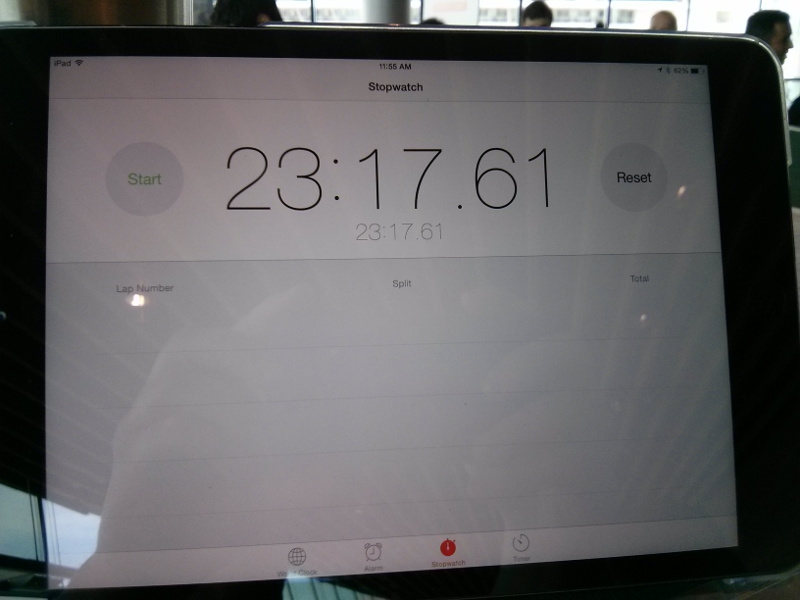
Wall-clock time for SUSE OpenStack Cloud
These two results wouldn't have been possible without the help of Tom and Ralf, but also without the whole SUSE OpenStack Cloud team that works on a daily basis on our product to improve it and to adapt it to the needs of our customers. We really have an awesome team (and btw, we're hiring)!
For reference, three other contestants succeeded in deploying OpenStack, with the fastest of them ending at 58 minutes after bonuses/penalties. And as I mentioned earlier, there were even more contestants (including some who are not vendors of an OpenStack distribution), which is really good to see. I hope we'll see even more in Tokyo!
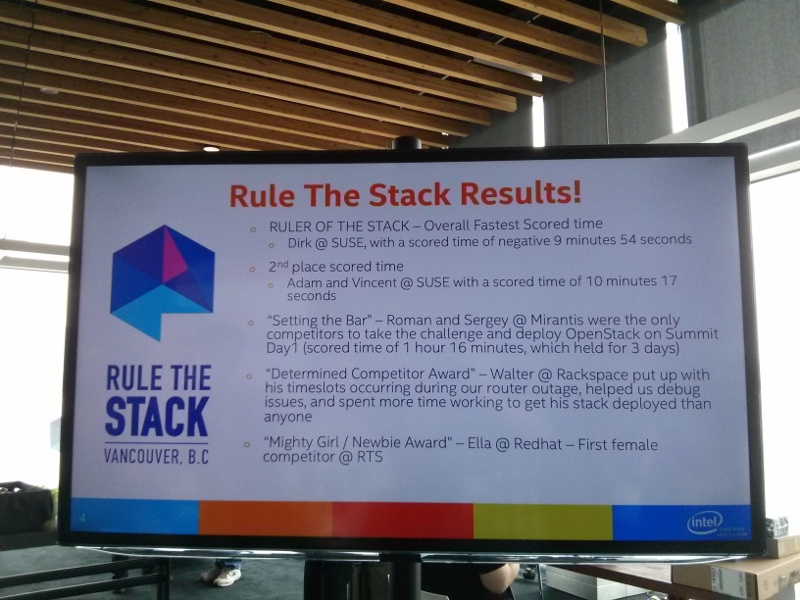
Results of the Rule the Stack contest
Also thanks to Intel for organizing this; I'm sure every contestant had fun and there was quite a good mood in the area reserved for the contest.
Update: See also the summary of the contest from the organizers.
28 May 2015 à 08:21
13 May 2015
(This came up in a discussion on debian-user-french@l.d.o)
When converting from sysvinit scripts to systemd init files, the default practice seems to be to start services without forking, and to use Type=simple in the service description.
What Type=simple does is, well, simple. from systemd.service(5):
If set to simple (the default value if neither Type= nor BusName= are specified), it is expected that the process configured with ExecStart= is the main process of the service. In this mode, if the process offers functionality to other processes on the system, its communication channels should be installed before the daemon is started up (e.g. sockets set up by systemd, via socket activation), as systemd will immediately proceed starting follow-up units.
In other words, systemd just runs the command described in ExecStart=, and it’s done: it considers the service is started.
Unfortunately, this causes a regression compared to the sysvinit behaviour, as described in #778913: if there’s a configuration error, the process will start and exit almost immediately. But from systemd’s point-of-view, the service will have been started successfully, and the error only shows in the logs:
root@debian:~# systemctl start ssh
root@debian:~# echo $?
0
root@debian:~# systemctl status ssh
● ssh.service - OpenBSD Secure Shell server
 Loaded: loaded (/lib/systemd/system/ssh.service; enabled)
 Active: failed (Result: start-limit) since mer. 2015-05-13 09:32:16 CEST; 7s ago
 Process: 2522 ExecStart=/usr/sbin/sshd -D $SSHD_OPTS (code=exited, status=255)
 Main PID: 2522 (code=exited, status=255)
mai 13 09:32:16 debian systemd[1]: ssh.service: main process exited, code=exited, status=255/n/a
mai 13 09:32:16 debian systemd[1]: Unit ssh.service entered failed state.
mai 13 09:32:16 debian systemd[1]: ssh.service start request repeated too quickly, refusing to start.
mai 13 09:32:16 debian systemd[1]: Failed to start OpenBSD Secure Shell server.
mai 13 09:32:16 debian systemd[1]: Unit ssh.service entered failed state.
With sysvinit, this error is detected before the fork(), so it shows during startup:
root@debian:~# service ssh start
 [....] Starting OpenBSD Secure Shell server: sshd/etc/ssh/sshd_config: line 4: Bad configuration option: blah
 /etc/ssh/sshd_config: terminating, 1 bad configuration options
 failed!
 root@debian:~#
It’s not trivial to fix that. The implicit behaviour of sysvinit is that fork() sort-of signals the end of service initialization. The systemd way to do that would be to use Type=notify, and have the service signals that it’s ready using systemd-notify(1) or sd_notify(3) (or to use socket activation, but that’s another story). However that requires changes to the service. Returning to the sysvinit behaviour by using Type=forking would help, but is not really a solution: but what if some of the initialization happens *after* the fork? This is actually the case for sshd, where the socket is bound after the fork (see strace -f -e trace=process,network /usr/sbin/sshd), so if another process is listening on port 22 and preventing sshd to successfully start, it would not be detected.
I wonder if systemd shouldn’t do more to detect problems during services initialization, as the transition to proper notification using sd_notify will likely take some time. A possibility would be to wait 100 or 200ms after the start to ensure that the service doesn’t exit almost immediately. But that’s not really a solution for several obvious reasons. A more hackish, but still less dirty solution could be to poll the state of processes inside the cgroup, and assume that the service is started only when all processes are sleeping. Still, that wouldn’t be entirely satisfying…
13 May 2015 à 08:29
12 May 2015
A couple of months ago, I was meeting colleagues of mine working on Docker and discussing about how much effort it would be to add support for it to SUSE OpenStack Cloud. It's been something that had been requested for a long time by quite a number of people and we never really had time to look into it. To find out how difficult it would be, I started looking at it on the evening; the README confirmed it shouldn't be too hard. But of course, we use Crowbar as our deployment framework, and the manual way of setting it up is not really something we'd want to recommend. Now would it be "not too hard" or just "easy"? There was only way to know that... And guess what happened next?
It took a couple of hours (and two patches) to get this working, including the time for packaging the missing dependencies and for testing. That's one of the nice things we benefit from using Crowbar: adding new features like this is relatively straight-forward, and so we can enable people to deploy a full cloud with all of these nice small features, without requiring them to learn about all the technologies and how to deploy them. Of course this was just a first pass (using the Juno code, btw).
Fast-forward a bit, and we decided to integrate this work. Since it was not a simple proof of concept anymore, we went ahead with some more serious testing. This resulted in us backporting patches for the Juno branch, but also making Nova behave a bit better since it wasn't aware of Docker as an hypervisor. This last point is a major problem if people want to use Docker as well as KVM, Xen, VMware or Hyper-V — the multi-hypervisor support is something that really matters to us, and this issue was actually the first one that got reported to us ;-) To validate all our work, we of course asked tempest to help us and the results are pretty good (we still have some failures, but they're related to missing features like volume support).
All in all, the integration went really smoothly :-)
Oh, I forgot to mention: there's also a docker plugin for heat. It's now available with our heat packages now in the Build Service as openstack-heat-plugin-heat_docker (Kilo, Juno); I haven't played with it yet, but this post should be a good start for anyone who's curious about this plugin.
12 May 2015 à 08:42
07 April 2015
I recently spent some time updating my systemd knowledge and decided to put together some slides that I’ll use for a lecture. I’m interested in feedback about things that are missing, unclear, etc. Available on slideshare, as PDF, and as LaTeX source.
07 April 2015 à 15:52
20 March 2015
Several improvements have been made to UDD’s Bug Search and Maintainer Dashboard recently.
On the Maintainer Dashboard side, the main new feature is a QA checks table that provides an overview of results from lintian, reproducible builds, piuparts, and ci.debian.net. Check the dashboard for the Ruby team for an example. Also, thanks to Daniel Pocock, the TODO items can now be exported as iCalendar tasks.
Bugs Search now has much better JSON and YAML outputs. It’s probably a good start if you want to do some data-mining on bugs. Packages can now be selected using the same form as the Maintainer Dashboard’s one, which makes it easy to build your own personal bug list, and will suppress the need for some of the team-specific listings.
Many bugs have been fixed too. More generally, thanks to the work of Christophe Siraut, the code is much better now, with a clean separation of the data analysis logic and the rendering sides that will make future improvements easier.
As the reminder, it’s quite easy to hack on UDD (even if you are not a DD). Please report bugs, including about additional features you would like to see!
20 March 2015 à 07:36
17 February 2015
I’d like to share a few tips that were useful to strengthen my personal email organization. Most of what follows is probably not very new nor special, but hey, let’s document it anyway.
Many people have an inbox folder that just grow over time. It’s actually similar to a twitter or RSS feed (except they probably agree that they are supposed to read more of their email “feed”). When I send an email to them, it sometimes happen that they don’t notice it, if the email arrives at a bad time. Of course, as long as they don’t receive too many emails, and there aren’t too many people relying on them, it might just work. But from time to time, it’s super-painful for those interacting with them, when they miss an email and they need to be pinged again. So let’s try not to be like them. :-)
Tip #1: do Inbox Zero (or your own variant of it)
Inbox Zero is an email management methodology inspired from David Allen’s Getting Things Done book. It’s best described in this video. The idea is to turn one’s Inbox into an area that is only temporary storage, where every email will get processed at some point. Processing can mean deleting an email, archiving it, doing the action described in the email (and replying to it), etc. Put differently, it basically means implementing the Getting Things Done workflow on one’s email.
Tip #1.1: archive everything
One of the time-consuming decisions in the original GTD workflow is to decide whether something should be eliminated (deleted) or stored for reference. Given that disk space is quite cheap, it’s much easier to never decide about that, and just archive everything (by duplicating the email to an archive folder when it is received). To retrieve archived emails when needed, I then use notmuch within mutt to easily search through recent (< 2 year) archives. I use archivemail to archive older email in compressed mboxes from time to time, and grepmail to search through those mboxes when needed.
I don’t archive most Debian mailing lists though, as they are easy to fetch from master.d.o with the following script:
#!/bin/sh
rsync -vP master.debian.org:~debian/*/*$1/*$1.${2:-$(date +%Y%m)}* .
Then I can fetch a specific list archive with getlist devel 201502, or a set of archives with e.g. getlist devel 2014, or the current month with e.g. getlist devel. Note that to use grepmail on XZ-compressed archives, you need libmail-mbox-messageparser-perl version 1.5002-3 (only in unstable — I was using a locally-patched version for ages, but finally made a patch last week, which Gregor kindly uploaded).
Tip #1.2: split your inbox
(Yes, this one looks obvious but I’m always surprised at how many people don’t do that.)
Like me, you probably receive various kinds of emails:
- emails about your day job
- emails about Debian
- personal emails
- mailing lists about your day job
- mailing lists about Debian
- etc.
Splitting those into separate folders has several advantages:
- I can adjust my ‘default action’ based on the folder I am in (e.g. delete after reading for most mailing lists, as it’s archived already)
- I can adjust my level of focus depending on the folder (I might not want to pay a lot of attention to each and every email from a mailing list I am only remotely interested in; while I should definitely pay attention to each email in my ‘DPL’ folder)
- When busy, I can skip the less important folders for a few days, and still be responsive to emails sent in my more important folders
I’ve seen some people splitting their inbox into too many folders. There’s not much point in having a per-sender folder organization (unless there’s really a recurring flow of emails from a specific person), as it increases the risk of missing an email.
I use procmail to organize my email into folders. I know that there are several more modern alternatives, but I haven’t looked at them since procmail does the job for me.
Resulting organization
I use one folder for my day-job email, one for my DPL email, one for all other email directed or Cced to me. Then, I have a few folders for automated notifications of stuff. My Debian mailing list folders are auto-managed by procmail’s $MATCH:
:0:
 * ^X-Mailing-List: <.*@lists\.debian\.org>
 * ^X-Mailing-List: <debian-\/[^@]*
 .ml.debian.$MATCH/
Some other mailing lists are in they separate folders, and there’s a catch-all folder for the remaining ones. Ah, and since I use feed2imap, I have folders for the RSS/Atom feeds I follow.
I have two different commands to start mutt. One only shows a restricted number of (important) folders. The other one shows the full list of (non-empty) folders. This is a good trick to avoid spending time reading email when I am supposed to do something more important. :)
As for many people probably, my own organization is loosely based on GTD and Inbox Zero. It sometimes happen that some emails stay in my Inbox for several days or weeks, but I very rarely have more than 20 or 30 emails in one of my main inbox folders. I also do reviews of the whole content of my main inbox folders once or twice a week, to ensure that I did not miss an email that could be acted on quickly.
A last trick is that I have a special folder replies, where procmail copies emails that are replies to a mail I sent, but which do not Cc me. That’s useful to work-around Debian’s “no Cc on reply to mailing list posts” policy.
I receive email using offlineimap (over SSH to my mail server), and send it using nullmailer (through a SSH tunnel). The main advantage of offlineimap over using IMAP directly in mutt is that using IMAP to a remote server feels much more sluggish. Another advantage is that I only need SSH access to get my full email setup to work.
Tip #2: tracking sent emails
Two recurring needs I had was:
- Get an overview of emails I sent to help me write the day-to-day DPL log
- Easily see which emails got an answer, or did not (which might mean that they need a ping)
I developed a short script to address that. It scans the content of my ‘Sent’ maildir and my archive maildirs, and, for each email address I use, displays (see example output in README) the list of emails sent with this address (one email per line). It also detects if an email was replied to (“R” column after the date), and abbreviates common parts in email addresses (debian-project@lists.debian.org becomes d-project@l.d.o). It also generates a temporary maildir with symlinks to all emails, so that I can just open the maildir if needed.
17 February 2015 à 17:34
09 November 2014
Jessie was frozen on November 5th, as planned. At the time of the freeze, 310 RC bugs remained to be fixed.
This is quite an achievement from the project as a whole, and the Release Team specifically. First, we froze on the date announced more than a year ago, and the freeze seems to have been well respected by all maintainers.
Second, with 310 RC bugs at the time of the freeze, we are probably breaking a record for all recent Debian releases (though I don’t have hard numbers for that). It seems that auto-removals of RC-buggy non-key packages helped a lot to keep the bug number under control. Assuming that all RC-buggy non-key packages were removed (which would be quite sad of course), we would even be down to about 150 RC bugs!
Could we have the shorter Debian freeze ever? (wheezy: 44 weeks; squeeze: 26 weeks; lenny: 28 weeks; etch: 17 weeks). Given that FOSDEM is 12 weeks away, could we even release before FOSDEM, and have a big party there to celebrate?
That’s not impossible, but we need everybody’s help. Random tip and tricks:
- Richard Hartmann’s weekly stats are actually generated from this web page, that provides a good live breakdown of RC bugs per category. Some RC bugs are hard, but some just deserve more attention. Some ideas of rather easy tasks:
- In the RC bugs list, sort bugs by last modification, take a bug that wasn’t worked on recently, and try to provide a summary of the situation and of possible actions.
- In the RC bugs list, sort bugs by bug number, and look at recent bugs: you might be among the first ones to look at them, so there might still be easy ways to make progress.
- Review and analyze proposed solutions in the lists of bugs with patches, or which have been fixed in unstable but not unblocked yet.
- And of course, try to attack the bulk of bugs without known fixes, and advance towards such a fix!
- If you are not so good at fixing bugs, do like me, and become good at opening new (real) bugs: the sooner they will be found, the sooner they can be fixed! I just opened ~100 RC bugs this morning, caused by packages failing to build from source in jessie.
09 November 2014 à 12:19
21 October 2014
This is an update of my previous attempt at summarizing this discussion. As I proposed one of the amendments, you should not blindly trust me, of course. :-)
First, let’s address two FAQ:
What is the impact on jessie?
On the technical level, none. The current state of jessie already matches what is expected by all proposals. It’s a different story on the social level.
Why are we voting now, then?
Ian Jackson, who submitted the original proposal, explained his motivation in this mail.
We now have four different proposals: (summaries are mine)
- [iwj] Original proposal (Ian Jackson): Packages may not (in general) require one specific init system (Choice 1 on this page)
- [lucas] Amendment A (Lucas Nussbaum): support for alternative init systems is desirable but not mandatory (Choice 2 on this page)
- [dktrkranz] Amendment B (Luca Falavigna): Packages may require a specific init system (Choice 3 on this page)
- [plessy] Amendment C (Charles Plessy): No GR, please: no GR required (Choice 4 on this page)
[plessy] is the simplest, and does not discuss the questions that the other proposals are answering, given it considers that the normal Debian decision-making processes have not been exhausted.
In order to understand the three other proposals, it’s useful to break them down into several questions.
Q1: support for the default init system on Linux
A1.1: packages MUST work with the default init system on Linux as PID 1.
(That is the case in both [iwj] and [lucas])
A1.2: packages SHOULD work with the default init system on Linux as PID 1.
With [dktrkranz], it would no longer be required to support the default init system, as maintainers could choose to require another init system than the default, if they consider this a prerequisite for its proper operation; and no patches or other derived works exist in order to support other init systems. That would not be a policy violation. (see this mail and its reply for details). Theoretically, it could also create fragmentation among Debian packages requiring different init systems: you would not be able to run pkgA and pkgB at the same time, because they would require different init systems.
Q2: support for alternative init systems as PID 1
A2.1: packages MUST work with one alternative init system (in [iwj])
(Initially, I thought that “one” here should be understood as “sysvinit”, as this mail, Ian detailed why he chose to be unspecific about the target init system. However, in that mail, he later clarified that a package requiring systemd or uselessd would be fine as well, given that in practice there aren’t going to be many packages that would want to couple specifically to systemd _or_ uselessd, but where support for other init systems is hard to provide.)
To the user, that brings the freedom to switch init systems (assuming that the package will not just support two init systems with specific interfaces, but rather a generic interface common to many init systems).
However, it might require the maintainer to do the required work to support additional init systems, possibly without upstream cooperation.
Lack of support is a policy violation (severity >= serious, RC).
Bugs about degraded operation on some init systems follow the normal bug severity rules.
A2.2: packages SHOULD work with alternative init systems as PID 1. (in [lucas])
This is a recommendation. Lack of support is not a policy violation (bug severity < serious, not RC). A2.3: nothing is said about alternative init systems (in [dktrkranz]). Lack of support would likely be a wishlist bug.
Q3: special rule for sysvinit to ease wheezy->jessie upgrades
(this question is implicitly dealt with in [iwj], assuming that one of the supported init systems is sysvinit)
A3.1: continue support for sysvinit (in [lucas])
For the jessie release, all software available in Debian ‘wheezy’ that supports being run under sysvinit should continue to support sysvinit unless there is no technically feasible way to do so.
A3.2: no requirement to support sysvinit (in [dktrkranz])
Theoretically, this could require two-step upgrades: first reboot with systemd, then upgrade other packages
Q4: non-binding recommendation to maintainers
A4.1: recommend that maintainers accept patches that add or improve
support for alternative init systems. (in both [iwj] and [lucas], with a different wording)
A4.2: say nothing (in [dktrkranz])
Q5: support for init systems with are the default on non-Linux ports
A5.1: non-binding recommendation to add/improve support with a high priority (in [lucas])
A5.2: say nothing (in [iwj] and [dktrkranz])
Comments are closed: please discuss by replying to that mail.
21 October 2014 à 13:07
17 October 2014
TL;DR: static version of http://debaday.debian.net/, as it was when it was shut down in 2009, available!
A long time ago, between 2006 and 2009, there was a blog called Debian Package of the Day. About once per week, it featured an article about one of the gems available in the Debian archive: one of those many great packages that you had never heard about.
At some point in November 2009, after 181 articles, the blog was hacked and never brought up again. Last week I retrieved the old database, generated a static version, and put it online with the help of DSA. It is now available again at http://debaday.debian.net/. Some of the articles are clearly outdated, but many of them are about packages that are still available in Debian, and still very relevant today.
17 October 2014 à 13:05
06 October 2014

In the last months, I have been working on improving the security of D-Bus, mainly to make it more resistant to denial of service attacks. This work was sponsored by Collabora.
Eight security issues were discovered, fixed and attributed a CVE. They were found by looking at the source code (in D-Bus and Linux' af_unix implementation), checking existing issues in the D-Bus bugzilla and a bit of luck.
Security issues fixed in D-Bus
- CVE-2014-3477(Bug #78979): dbus-daemon sent an AccessDenied error to the service instead of a client when the client is prohibited from accessing the service, which allowed local users to cause a denial of service (initialization failure and exit) or possibly conduct a side-channel attack via a D-Bus message to an inactive service.
- CVE-2014-3532(Bug #80163): when running on Linux 2.6.37-rc4 or later, local users could cause a denial of service (system-bus disconnect of other services or applications) by sending a message containing a file descriptor, then exceeding the maximum recursion depth before the initial message is forwarded.
- CVE-2014-3533(Bug #80469): dbus-daemon allowed local users to cause a denial of service (disconnect) via a certain sequence of crafted messages that caused the dbus-daemon to forward a message containing an invalid file descriptor.
- CVE-2014-3635(Bug #83622): an off-by-one error in dbus-daemon allowed remote attackers to cause a denial of service (dbus-daemon crash) or possibly execute arbitrary code by sending one more file descriptor than the limit, which triggered a heap-based buffer overflow or an assertion failure.
- CVE-2014-3636(Bug #82820): a denial-of-service vulnerability in dbus-daemon allowed local attackers to prevent new connections to dbus-daemon, or disconnect existing clients, by exhausting descriptor limits.
- CVE-2014-3637(Bug #80559): malicious local users could create D-Bus connections to dbus-daemon which could not be terminated by killing the participating processes, resulting in a denial-of-service vulnerability.
- CVE-2014-3638(Bug #81053): dbus-daemon suffered from a denial-of-service vulnerability in the code which tracks which messages expect a reply, allowing local attackers to reduce the performance of dbus-daemon.
- CVE-2014-3639(Bug #80919): dbus-daemon did not properly reject malicious connections from local users, resulting in a denial-of-service vulnerability.
Other fixes
In addition to fixing specific bugs, I also explored ideas to restrict the number of D-Bus connections a
process or a
cgroup could create. After discussions with upstream, those ideas were not retained upstream. But while working on cgroups,
my patch for parsing /proc/pid/cgroup was accepted in Linux 3.17.
Identify bogus D-Bus match rules
D-Bus security issues are not all in dbus-daemon: they could be in applications misusing D-Bus. One common mistake done by applications is to receive a D-Bus signal and handle it without checking it was really sent by the expected sender. It seems impossible to check the code of all applications potentially using D-Bus in order to see if such a mistake is done. Instead of looking the code of random applications, my approach was to add a new method
GetAllMatchRulesin dbus-daemon to retrieve all match rules and look for suspicious patterns. For example, a match rule for NameOwnerChanged signals that does not filter on the sender of such signals is suspicious and it worth checking the source code of the applications to see if it is legitimate. With this method, I was able to fix bugs in
Bluez,
ConnMan,
Pacrunner,
Ofonoand
Avahi.
GetAllMatchRulesis released in dbus 1.9.0 and it is now possible to try it
without recompiling D-Busto enable the feature. I have used a
script to tell me which processes register suspicious match rules. I would like if there was a way to do that in a graphical interface. It's not ready yet, but I started
a patch in D-Feet.
06 October 2014 à 16:19
10 September 2014
The start of the jessie freeze is quickly approaching, so now is a good time to ensure that packages you rely on will the part of the upcoming release. Thanks to automated removals, the number of release critical bugs has been kept low, but this was achieved by removing many packages from jessie: 841 packages from unstable are not part of jessie, and won’t be part of the release if things don’t change.
It is actually simple to check if you have packages installed locally that are part of those 841 packages:
apt-get install how-can-i-help (available in backports if you don’t use testing or unstable)how-can-i-help --old- Look at packages listed under Packages removed from Debian ‘testing’ and Packages going to be removed from Debian ‘testing’
Then, please fix all the bugs :-) Seriously, not all RC bugs are hard to fix. A good starting point to understand why a package is not part of jessie is tracker.d.o.
On my laptop, the two packages that are not part of jessie are the geeqie image viewer (which looks likely to be fixed in time), and josm, the OpenStreetMap editor, due to three RC bugs. It seems much harder to fix… If you fix it in time for jessie, I’ll offer you a $drink!
10 September 2014 à 19:28
01 September 2014
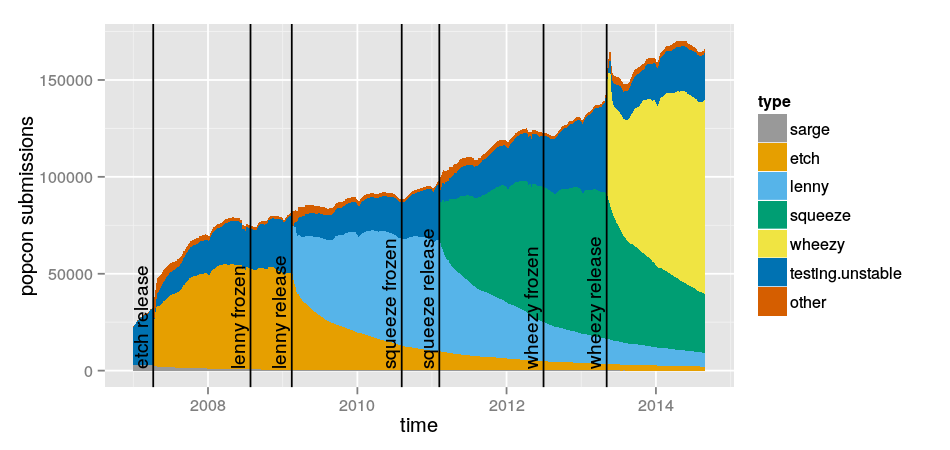
In March 2013 I looked at Debian releases used by popcon participants. I’ve just re-done the same analysis. Please see the previous post on this topic for details.
01 September 2014 à 01:53
31 August 2014
After an intensive evening of brainstorming by the 5th floor cabal, I am happy to release the very first version of the Debian Trivia, modeled after the famous TCP/IP Drinking Game. Only the questions are listed here — maybe they should go (with the answers) into a package? Anyone willing to co-maintain? Any suggestions for additional questions?
- what was the first release with an “and-a-half” release?
- Where were the first two DebConf held?
- what are Debian releases named after? Why?
- Give two names of girls that were originally part of the Debian Archive Kit (dak), that are still actively used today.
- Swirl on chin. Does it ring a bell?
- What was Dunc Tank about? Who was the DPL at the time? Who were the release managers during Dunc Tank?
- Cite 5 different valid values for a package’s urgency field. Are all of them different?
- When was the Debian Maintainers status created?
- What is the codename for experimental?
- Order correctly lenny, woody, etch, sarge
- Which one was the Dunc Tank release?
- Name three locations where Debian machines are hosted.
- What does the B in projectb stand for?
- What is the official card game at DebConf?
- Describe the Debian restricted use logo.
- One Debian release was frozen for more than a year. Which one?
- name the kernel version for sarge, etch, lenny, squeeze, wheezy. bonus for etch-n-half!
- What happened to Debian 1.0?
- Which DebConfs were held in a Nordic country?
- What does piuparts stand for?
- Name the first Debian release.
- Order correctly hamm, bo, potato, slink
- What are most Debian project machines named after?
31 August 2014 à 08:42
24 August 2014
Stefano Zacchiroli opened DebConf’14 with an insightful talk titled Debian in the Dark Ages of Free Software (slides available, video available soon).
He makes the point (quoting slide 16) that the Free Software community is winning a war that is becoming increasingly pointless: yes, users have 100% Free Software thin client at their fingertips [or are really a few steps from there]. But all their relevant computations happen elsewhere, on remote systems they do not control, in the Cloud.
That give-up on control of computing is a huge and important problem, and probably the largest challenge for everybody caring about freedom, free speech, or privacy today. Stefano rightfully points out that we must do something about it. The big question is: how can we, as a community, address it?
Towards a Free Service Definition?
I believe that we all feel a bit lost with this issue because we are trying to attack it with our current tools & weapons. However, they are largely irrelevant here: the Free Software Definition is about software, and software is even to be understood strictly in it, as software programs. Applying it to services, or to computing in general, doesn’t lead anywhere. In order to increase the general awareness about this issue, we should define more precisely what levels of control can be provided, to understand what services are not providing to users, and to make an informed decision about waiving a particular level of control when choosing to use a particular service.
Benjamin Mako Hill pointed out yesterday during the post-talk chat that services are not black or white: there aren’t impure and pure services. Instead, there’s a graduation of possible levels of control for the computing we do. The Free Software Definition lists four freedoms — how many freedoms, or types of control, should there be in a Free Service Definition, or a Controlled-Computing Definition? Again, this is not only about software: the platform on which a particular piece of software is executed has a huge impact on the available level of control: running your own instance of WordPress, or using an instance on wordpress.com, provides very different control (even if as Asheesh Laroia pointed out yesterday, WordPress does a pretty good job at providing export and import features to limit data lock-in).
The creation of such a definition is an iterative process. I actually just realized today that (according to Wikipedia) the very first occurrence of an attempt at a Free Software Definition was published in 1986 (GNU’s bulletin Vol 1 No.1, page 8) — I thought it happened a couple of years earlier. Are there existing attempts at defining such freedoms or levels of controls, and at benchmarking such criteria against existing services? Such criteria would not only include control over software modifications and (re)distribution, but also likely include mentions of interoperability and open standards, both to enable the user to move to a compatible service, and to avoid forcing the user to use a particular implementation of a service. A better understanding of network effects is also needed: how much and what type of service lock-in is acceptable on social networks in exchange of functionality?
I think that we should inspire from what was achieved during the last 30 years on Free Software. The tools that were produced are probably irrelevant to address this issue, but there’s a lot to learn from the way they were designed. I really look forward to the day when we will have:
- a Free Software Definition equivalent for services
- Debian Free Software Guidelines-like tests/checklist to evaluate services
- an equivalent of The Cathedral and the Bazaar, explaining how one can build successful business models on top of open services
Exciting times!
24 August 2014 à 15:39
15 August 2014
Everyone has been blogging about GUADEC, but I’d like to talk about my other favorite conference of the year, which is GNOME.Asia. This year, it was in Beijing, a mightily interesting place. Giant megapolis, with grandiose architecture, but at the same time, surprisingly easy to navigate with its efficient metro system and affordable taxis. But the air quality is as bad as they say, at least during the incredibly hot summer days where we visited.
The conference itself was great, this year, co-hosted with FUDCon’s asian edition, it was interesting to see a crowd that’s really different from those who attend GUADEC. Many more people involved in evangelising, deploying and using GNOME as opposed to just developing it, so it allows me to get a different perspective.
On a related note, I was happy to see a healthy delegation from Asia at GUADEC this year!

15 August 2014 à 04:50
17 July 2014
Two years ago, I got appointed as chairman of the openSUSE Board. I was very excited about this opportunity, especially as it allowed me to keep contributing to openSUSE, after having moved to work on the cloud a few months before. I remember how I wanted to find new ways to participate in the project, and this was just a fantastic match for this. I had been on the GNOME Foundation board for a long time, so I knew it would not be easy and always fun, but I also knew I would pretty much enjoy it. And I did.
Fast-forward to today: I'm still deeply caring about the project and I'm still excited about what we do in the openSUSE board. However, some happy event to come in a couple of months means that I'll have much less time to dedicate to openSUSE (and other projects). Therefore I decided a couple of months ago that I would step down before the end of the summer, after we'd have prepared the plan for the transition. Not an easy decision, but the right one, I feel.
And here we are now, with the official news out: I'm no longer the chairman :-) (See also this thread) Of course I'll still stay around and contribute to openSUSE, no worry about that! But as mentioned above, I'll have less time for that as offline life will be more "busy".
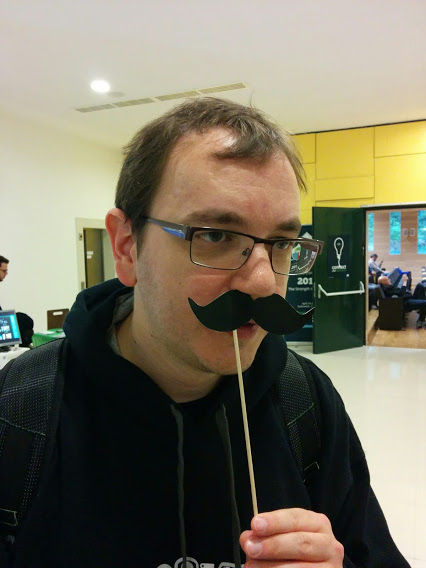
openSUSE Board Chairman at oSC14
Since I mentioned that we were working on a transition... First, knowing the current board, I have no doubt everything will be kept pushed in the right direction. But on top of that, my good friend Richard Brown has been appointed as the new chairman. Richard knows the project pretty well and he has been on the board for some time now, so is aware of everything that's going on. I've been able to watch his passion for the project, and that's why I'm 100% confident that he will rock!
17 July 2014 à 14:40
09 April 2014
While trying to debug a bandwidth problem on a 3G connection, I tried speedtest.net, which ranks fairly high when one searches for “bandwidth test” on various search engines. I was getting very strange results, so I started wondering if my ISP might be bandwidth-throttling all traffic except the one from speedtest.net tests. After all, that’s on a 3G network, and another french 3G ISP (SFR) apparently uses Citrix ByteMobile to optimize the QoE by minifying HTML pages and recompressing images on-the-fly (amongst other things).
So, I fired wireshark, and discovered that no, it’s just speedtest being a bit naive. Speedtest uses its own text-based protocol on port 8080. Here is an excerpt of a download speed test:
> HI

< HELLO 2.1 2013-08-14.01

> DOWNLOAD 1000000

< DOWNLOAD JABCDEFGHIJABCDEFGHIJABCDEFGHIJABCDEFGHIJABCDEFGHIJABCDEFGHIJABCDEFGHIJABCDEFGHIJABCDEFGHIJABCDEFGHIJABCDEFGHIJABCDEFGHIJABCDEFGHIJABCDEFGHIJABCDEFGHIJABCDEFGHIJABCDEFGHIJABCDEFGHIJABCDEFGHIJABCDEFGHIJABCDEFGHIJABCDEFGHIJABCDEFGHIJABCDEFGHIJABCDEFGHIJABCDEFGHIJABCDEFGHIJABCDEFGHIJABCDEFGHIJABCDEFGHIJABCDEFGHIJABCDEFGHIJABCDEFGHIJABCDEFGHIJABCDEFGHIJABCDEFGHIJABCDEFGHIJABCDEFGHIJABCDEFGHIJABCDEFGHIJABCDEFGHIJABCDEFGHIJABCDEFGHIJABCDEFGHIJABCDEFGHIJABCDEFGHIJABCDEFGHIJABCDEFGHIJABCDEFGHIJABCDEFGHIJABCDEFGHIJABCDEFGHIJABCDEFGHIJABCDEFGHIJABCDEFGHIJABCDEFGHIJABCDEFGHIJABCDEFGHIJABCDEFGHIJABCDEFGHIJABCDEFGHIJABCDEFGHIJABCDEFGHIJABCDEFGHIJABCDEFGHIJABCDEFGHIJABCDEFGHIJABCDEFGHIJABCDEFGHIJABCDEFGHIJABCDEFGHIJABCDEFGHIJABCDEFGHIJABCDEFGHIJABCDEFGHIJABCDEFGHIJABCDEFGHIJABCDEFGHIJABCDEFGHIJABCDEFGHIJABCDEFGHIJABCDEFGHIJABCDEFGHIJABCDEFGHIJABCDEFGHIJABCDEFGHIJABCDEFGHIJABCDEFGHIJABCDEFGHIJABCDEFGHIJABCDEFGHIJABCDEFGHIJABCDEFGHIJABCDEFGHIJABCDEFGHIJABCDEFGHIJABCDEFGHIJABCDEFGHIJABCDEFGHIJABCDEFGHIJABCDEFGHIJABCDEFGHIJABCDEFGHIJABCDEFGHIJABCDEFGHIJABCDEFGHIJABCDEFGHIJABCDEFGHIJABCDEFGHIJABCDEFGHIJABCDEFGHIJABCDEFGHIJABCDEFGHIJABCDEFGHIJABCDEFGHIJABCDEFGHIJABCDEFGHIJABCDEFGHIJABCDEFGHIJABCDEFGHIJABCDEFGHIJABCDEFGHIJABCDEFGHIJABCDEFGHIJABCDEFGHIJABCDEFGHIJABCDEFGHIJABCDEFGHIJABCDEFGHIJABCDEFGHIJABCDEFGHIJABCDEFGHIJABCDEFGHIJABCDEFGHIJABCDEFGHIJABCDEFGHIJABCDEFGHIJABCDEFGHIJABCDEFGHIJABCDEFGHIJABCDEFGHIJABCDEFGHIJABCDEFGHIJABCDEFGHIJABCDEFGHIJABCDEFGHIJABCDEFGHIJABCDEFGHIJABCDEFGHIJABCDEFGHIJABCDEFGHIJABCDEFGHIJABCDEFGHIJABCDEFGHIJABCDEFGHIJABCDEFGHIJABCDEFGHIJABCDEFGHIJABCDEFGHIJABCDEFGHIJABCDEFGHIJABCDEFGHIJABCDEFG
Yeah, right: sequences of “ABCDEFGHIJ”. How course, extremely easy to compress, which apparently happens transparently on 3G (or is it PPP? but I tried to disable PPP compression, and it did not see any change).
It’s funny how digging into problems that look promising at first sight often results in big disappointments :-(
09 April 2014 à 19:23
19 March 2014
Multimedia devices traditionally don't manage the network bandwidth required by applications. This causes a problem when users try to watch a streaming video or listen to a web radio seamlessly while other applications are downloading other content in the background. The background downloads can use too much bandwidth for the streaming video or web radio to keep up and users notice unnecessary interruptions in the playback.
I have been working on an approach to improve this using traffic control on Linux. This work was sponsored by Collabora.
What is traffic control
Traffic control is a technique to control network traffic in order to optimise or guarantee performance, low-latency, and/or bandwidth. This includes deciding which packets to accept at what rate in an input interface and determining which packets to transmit in what order at what rate on an output interface.
On Linux, applications can send the traffic control configuration to the kernel using a Netlink socket with the NETLINK_ROUTE protocol. By default, traffic control on Linux consists of a single queue which collects entering packets and dequeues them as quickly as the underlying device can accept them. The tc tool (from the iproute2 package) or the more recent "nl-*" tools (part of libnl) are different implementations but they can both be used to configure traffic control. Libnl has an incomplete support for traffic control but is in active development and progressing quickly.
Difficulty of shaping ingress traffic
Traffic control and shaping comes in two forms, the control of packets being received by the system (ingress) and the control of packets being sent out by the system (egress). Shaping outgoing traffic is reasonably straight-forward, as the system is in direct control of the traffic sent out through its interfaces. Shaping incoming traffic is however much harder as the decision on which packets to sent over the medium is controlled by the sending side and can't be directly controlled by the system itself.
However, for multimedia devices, control over incoming traffic is far more important then controlling outgoing traffic. Our use-case is ensuring glitch-free playback of a media stream (e.g. internet radio). In such a case, essentially, a minimal amount of incoming bandwidth needs to be reserved for the media stream.
For shaping (or rather influencing or policing) incoming traffic, the only practical approach is to put a fake bottleneck in place on the local system and rely on TCP congestion control to adjust its rate to match the intended rate as enforced by this bottleneck. With such a system it's possible to, for example, implement a policy where traffic that is not important for the current media stream (background traffic) can be limited, leaving the remaining available bandwidth for the more critical streams.
On Linux, ingress traffic control ("ingress qdisc" on the graph) happens before the Netfilter subsystem:
Difficulty of shaping on mobile networks
However, to complicate matters further, in mobile systems which are connected wirelessly to the internet and have a tendency to move around it's not possible to know the total amount of available bandwidth at any specific time as it's constantly changing. Which means, a simple strategy of capping background traffic at a static limit simply can't work.
The implemented solution
To cope with the dynamic nature, a traffic control daemon (tcmmd) has been implemented which can dynamically update the kernel configuration to match the current needs of the playback applications and adapt to the current network conditions. Furthermore to address the issues mentioned above, the implementation will use the following strategy:
- Split the traffic streams into critical traffic and background traffic. Police the incoming traffic by limiting the bandwidth available to background traffic with the goal of leaving enough bandwidth available for critical streams.
- Instead of having static configuration, let applications (e.g. a media player) indicate when the current traffic rate is too low for their purposes. This both means the daemon doesn't have to actively measure the traffic rate and allows it cope with streams that don't have a constant bitrate more naturally.
Communication between the traffic control daemon and the applications is done via D-Bus. The D-Bus interface allow applications to register critical streams by passing the standard 5-tuple (source ip and port, destination ip and port and protocol) which uniquely identify a stream and indicate when a particular stream bandwidth is too low.
To allow the daemon to effectively control the incoming traffic, a so-called Intermediate Functional Block device (ifb0) is used to provide a virtual network device to provide an artificial bottleneck. This is done by transparently redirecting the incoming traffic from the physical network device through the virtual network device and shape the traffic as it leaves the virtual device again. The reason for the traffic redirection is to allow the usage of the kernels egress traffic control to effectively be used on incoming traffic. The results in the example setup shown below (with eth0 being a physical interface and ifb0 the accompanying virtual interface).
To demonstrate the functionality as described above, a simple demonstration media application using Gstreamer (tcdemo) has been written that communicates with the Traffic control daemon in the manner described.
Testing, the set-up
The traffic control feature in tcdemo can be enabled or disabled on the command line. This allowed me to compare the behaviour in both cases.
On my left, I have a web server serving both the files for a video stream and the files for background downloads. On my right, I have a multimedia device rendering a video stream while downloading other files on the same web server.
Traffic control is only useful when the available bandwidth is limited. In order to have meaningful tests, I simulated a low bandwidth with the following commands on the web server:
tc qdisc add dev wlan0 root handle 1: cbq avpkt 1000 bandwidth 10Mbit
tc class add dev wlan0 parent 1: classid 1:1 cbq rate 3Mbit allot 1500 prio 3 bounded isolated
tc filter add dev wlan0 parent 1: protocol ip u32 match ip protocol 6 0xff match ip sport 80 0xffff flowid 1:1
Only the traffic from port 80/http was limited. It is important to note that the background traffic and the stream traffic were both going through the same bottleneck.Tcdemo was playing a video file streamed over http while 8 wgets were downloading the same file continuously. The 9 connections were competing for the limited bandwidth. Without traffic control, tcdemo would not have got enough bandwidth.The following graph shows what happened with traffic control. The video streaming is composed of several phases:- tcdemo opened the HTTP connection and its GStreamer pipeline started downloading. At the same time, tcmmd was notified there was a new stream connection and it restricted any potential background traffic to a very low limit. As long as the initial GStreamer queue was buffering, the background traffic limit did not change.
- The GStreamer queue became full at t=4s and the video started to be played on the screen. The daemon increased the limit on the background traffic exponentially and the stream bandwidth got reduced as a consequence.
- Despite the stream bandwidth degrading slowly, GStreamer managed to keep its queue over 75% full until t=25s. When the queue is more than 75% full, Gstreamer does not report it because tcdemo chose that threshold with the low-percent property on GstQueue2 (the graph shows 100% in this case).
- At t=30s, the GStreamer queue was less than 70% full and that threshold triggered tcmmd to restrict the background traffic to its minimum.
- The stream could use most of the bandwidth and the GStreamer queue became full quickly at t=31s. The background traffic could start its exponential growth again.
Thanks to traffic control, the GStreamer queue never got empty in my test.
Get the sources
git clone git://git.collabora.co.uk/git/user/alban/tcmmd
git clone https://github.com/alban/tcmmd
FAQ
Q: Do I need any privileges to run this?
A: No privileges required for tcdemo, the GStreamer application. But tcmmd needs CAP_NET_ADMIN to change the TC rules.
Q: The 5-tuple contains the TCP source port. How does the application know that number?
A: The application can either call bind(2) before connect(2) to choose a TCP source port, or call getsockname(2) after connect(2) to retrieve the TCP source port assigned automatically by the kernel. The former allows to install the traffic control rules before the call to connect(2) triggers the emission and reception of the first packets on the network. The latter means the first few packets will be exchanged without being shaped by the traffic control. Tcdemo implements the latter to avoid more invasive changes in the souphttpsrc GStreamer element and libsoup. See bgo#721807.
Q: What happens if an application forgets to unregister a 5-tuple when the video stream finishes?
A: That would be bad manners from the application. The current traffic control settings would remain. And if the application notifies tcmmd that its buffer was empty and forgets to notify any changes, the background traffic would be severely throttled. However, if the application just terminates or crashes, tcmmd would notice it immediately on D-Bus and the traffic control rules would be removed.
Q: Does tcmmd remove its traffic control rules when terminated?
A: It depends how it is terminated. Tcmmd removes its traffic control rules on SIGINT and SIGTERM. But the rules remain in other cases (SIGSEGV, SIGKILL, etc.). If it is a problem in case of crash, tcmmd initialisation properly removes previous rules, so you could start tcmmd and interrupt it with ctrl-c.
A: First, SO_MARK requires CAP_NET_ADMIN which is not something that media player should have. It could be worked around by fd-passing the socket to a more privileged daemon to call setsockopt-SO_MARK but it's not elegant. More importantly, tcmmd's goal is not to shape the egress traffic but the ingress traffic. The shaping of incoming packets is performed very early in the Linux network stack: it happens before Netfilter, and before the packet is associated to a socket. So we can't check the SO_MARK of a socket to shape incoming packets.
Q: Instead of using the 5-tuple, why not using cgroups? A: The granularity of cgroups are only per-process. So the traffic control would not be able to distinguish between different HTTP connections in a web browser used to render a video stream and used for background downloads. And for the same reason as setsockopt-SO_MARK, it would not work for shaping ingress traffic: we would not be able to link the packet to any process or cgroup. Q: Instead of sending the 5-tuple to tcmmd, why not set the IP type-of-service (TOS) on outgoing packets with
setsockopt-SO_PRIORITY to avoid changes in the application and have an iptables target to feed that information about connections back to the ingress traffic control?
A: It could be possible if the bandwidth was fixed, but on mobile networks, the application needs to be changed anyway to give feedback when the queue in the GStreamer pipeline get emptied.
Q: Why not play with the TCP windows instead shaping the ingress traffic?
A: As far as I know, Linux does not have the infrastructure for that. The TCP windows to manipulate would not be from the GStreamer application but from all other connections, so it can't be done from userspace.
Q: Does tcdemo require any new feature in GStreamer?
Q: Does tcmmd require any new feature in the Linux kernel?
A: No.
Q: Does tcmmd work on several network interfaces (e.g. eth0 + wlan0)?
A: No, at the moment tcmmd only support one interface and it has to be started after the interface is up. Patches welcome!
Q: Tcmmd uses both libnl and /sbin/tc via system() calls. Why?
A: My goal is to use libnl and avoid spawning processes to call /sbin/tc. I just didn't have time to finish this. It will involve checking that libnl has the right features. Some needed features such as u32 action support were implemented recently in the last version.
Q: How did you get the graphs?
A: I used tcmmd's --save-stats option and the script tests/plot-tcmmd-log.sh.
Q: Why is there so frequent Netlink communication between tcmmd and the kernel?
A: One part of this is to gather regular statistics in order to generate graphs if the option --save-stats was used. The other part is for implementing the exponential progression of the bandwidth allocated to the background traffic: at regular interval, tcmmd changes the rate assigned to a qdisc. It could be avoided by implementing a specialised qdisc in the kernel for our use case. It would require more thinking how to design the API for that new qdisc.
Q: Does it work with IPv6?
A: No. The architecture is not specific to IPv4 but it is just not implemented yet for IPv6. Tcmmd would need to generate new TC rules because the IP headers are different between IPv4 and IPv6.
Thanks Sjoerd for the architecture diagram and proof-reading.
19 March 2014 à 14:11
27 February 2014
Following my blog post on the topic, I played a bit with various options.
But let’s explain my use case (which might be quite specific). I need to deal with three main sources of events:
- the Zimbra instance from my lab. It provides a CalDav interface.
- the ICS export from my University’s teaching timetable.
- a calendar for personal stuff. I don’t want to use my lab’s Zimbra for that.
Additionally, I follow some ICS feeds for some colleagues and other events.
I tend to access my calendar mostly on my computer, and sometimes on my N900 phone.
None of the web interfaces I looked at enabled me to (1) manage different calendars hosted on different CalDav servers; (2) subscribe to ICS feeds; (3) provide a CalDav interface to synchronize my phone.
I ended up using a radicale instance for my personal calendar, which was extremely easy to set up. It’s unfortunately a bit slow when there are many events (1600 since 2010 in my case), so I ended up importing only future events, and I will probably have to cleanup from time to time.
I switched to using IceDove with the Lightning add-on to manage all my calendars and ICS feeds. It’s unfortunately slower and less user-friendly than Google Calendar, but I’ll live with it.
On my N900, I used syncevolution to synchronize my various CalDav calendars. It works fine, but understanding how to configure it is rather tricky due to the number of concepts involved (templates, databases, servers, contexts, …). The synchronization is quite slow (several minutes for the 400-events Zimbra calendar), but works.
I also wanted a way to export my calendars to colleagues (both in a “free/busy” version, and in a “full information” version). I quickly hacked something using ruby-agcaldav (which is not packaged in Debian, and required quite a few dependencies, but it was easy to generate packages for all of them using gem2deb — the situation with other languages did not look better).
The resulting script is:
require 'agcaldav'

require 'date'
cal = AgCalDAV::Client.new(:uri => 'LABCALDAVSERVER', :user => 'xx', :password => "xx")

ev = cal.find_events(:start => '2014-02-01', :end => '2200-01-01')
cal = AgCalDAV::Client.new(:uri => 'RADICALESERVER', :user => 'xx', :password => "xx")

ev2 = cal.find_events(:start => '2014-02-01', :end => '2200-01-01')
limit = (Time::now - 7*86400).to_datetime
# create new empty calendars

ncpriv = Icalendar::Calendar.new

ncpub = Icalendar::Calendar.new
(ev + ev2).each do |e|

  next if e.end < limit # drop old events to keep the calendar small
  # build event for the free/busy calendar

  pe = Icalendar::Event.new

  pe.start = e.start

  pe.end = e.end

  pe.klass = "PRIVATE"

  pe.transp = e.transp

  ncpriv.add(pe)
  # build event for the calendar with event information

  pube = Icalendar::Event.new

  pube.start = e.start

  pube.end = e.end

  pube.transp = e.transp

  if not e.klass == "PRIVATE"

    pube.summary = e.summary

    pube.location = e.location

  end

  ncpub.add(pube)

end
# export free/busy calendar

fd = File::new('xx.ics', 'w')

fd.puts ncpriv.to_ical

fd.close
# export calendar with event information

fd = File::new('yy-Zeeh9bie.ics', 'w')

fd.puts ncpub.to_ical

fd.close
So, mostly everything works. The only thing that doesn't is that I haven't found a way to subscribe to an ICS feed on my N900. Any ideas?
27 February 2014 à 16:39
25 February 2014
I’m trying to self-host my calendar setup, and I must admit that I’m lost between all the different solutions.
My requirements are:
- (A) manage my own personal calendar using a reasonably modern web interface (probably on my own CalDAV server)
- (B) display a dozen public ICS calendars in the web interface. Organizing those public calendars in a tree would be great.
- (C) display several caldav calendars (from two different instances of zimbra), preferably in RW mode
- (D) provide ICS links with a secret token that allow me to provide a full view of my calendar to some people (except for private events, where I should just be marked ‘busy’)
- (E) provide ICS links with a secret token that allow me to provide a “busy/available” view of my calendar to some people
- (F) export something usable on my n900. MFE would be great since that is already known to work.
- (G) easy to setup (Debian packages available in wheezy or wheezy-backports, especially for the server part)
- (H) preferably lightweight. I don’t need a full groupware application. I can ignore the other bits if really needed.
It does not seem to be possible to find a single framework doing all of the above. AFAIK:
- Owncloud does A, D, G
- Baikal does A. not sure about the rest.
- For (B), an alternative is to script the download of the ics and then upload it to the CalDAV using cadaver. But that sounds quite low-level for such a trivial use case.
- I’ve looked at using IceOwl (and Thunderbird+Lightning) with a CalDAV server such as Radicale. That would solve A (using iceowl instead), B, C. But which CalDAV servers support D, E, F ? Radicale does not do any of those, apparently.
What did I miss?
25 February 2014 à 21:31
17 January 2014
One of my pet projects in Debian is the Debian Maintainer Dashboard. Built on top of UDD, DMD provides a maintainer-centric view to answer the “I have a few hours for Debian, what should I do now?” question (see example).
Christophe Siraut did a lot of great work recently on DMD, rewriting much of the internals. As a result, he also added a RSS feed feature: you can now get notified of new TODO list items by subscribing to that feed.
If you have suggestions or comments, please use the debian-qa@ list (see this thread).
Thanks, Christophe!
17 January 2014 à 09:20
07 October 2013
I attended Open World Forum last week (thanks to Inria for funding my travel). It was a fantastic opportunity to meet many people, and to watch great talks. If I had to single out just one talk, it would clearly be John Sullivan’s What do you mean you can’t Skype?!.
On Saturday, I delivered a talk presenting the Debian project. It was my first DPL-ish talk to the general public, so it still needs some tuning, but I think it went quite well (slides available). Next opportunity to talk about Debian: LORIA, Nancy, France, 2013-10-17 13:30 (iPAC seminar).
07 October 2013 à 14:33